How to Build a Kalshi Trading Bot With AI
How I used Claude Code to automate Kalshi sports trading: architecture, API key security, fill rate, and a starter prompt to build your own.

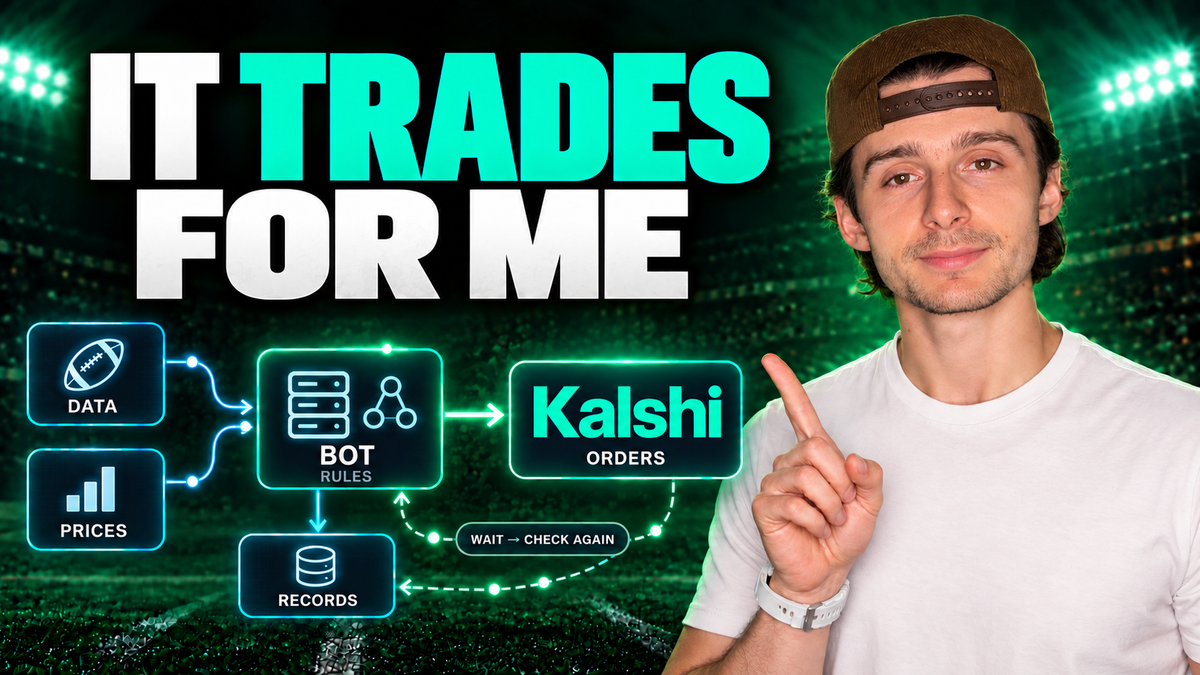
I used Claude Code to build a Kalshi trading bot, and in the past two weeks I have not placed a single manual trade. The bot now has hundreds of completed trades behind it — college football, the NFL, baseball, and soccer across more than five leagues worldwide.
It watches game outcomes, tracks every Kalshi market I care about including bids, asks and every parameter I set, checks my rules, and submits orders while my computer is completely turned off.
This is the full breakdown of how I went from describing an idea in plain English to working software. The architecture, the API key setup, the logic framework, the starter prompt, and the mistakes that cost me trades I never wanted to take.
One thing up front: I'm not sharing the strategy itself, and the section below explains exactly why that's in your interest as much as mine. Everything else — the entire build process — is here.
Disclosure: this isn't sponsored and Kalshi didn't ask for it. The referral link is the only monetization, and it currently pays $25 in credits when you trade your first $25.
Table of Contents
- What This Bot Actually Does
- Prerequisites: What You'll Need
- Step-by-Step: Building the Bot
- The Starter Prompt Framework
- The Improvement Loop
- Why Fill Rate Beats Paper Trading
- Why the Strategy Itself Stays Private
- Realistic Expectations
- Common Mistakes to Avoid
- Frequently Asked Questions
- The Bottom Line
Key Takeaways
- You don't write any code. You direct a coding agent on what to track and what you're trying to achieve — vibe coding a trading strategy.
- Two data inputs drive everything: live sports data and Kalshi market data.
- Hosting costs about $24/month on DigitalOcean, down from a $6/month starting tier. An always-on computer works as a free alternative.
- Never paste your API keys into a chat window. Store them with the code on your host.
- Market orders make you a taker — higher fees and bad fills on illiquid markets, which destroys thin edges.
- Start with one contract. Maximum risk is $0.99 per contract, so a broken strategy costs almost nothing to discover.
- Use real money, not paper trading, because paper trading can't show you your fill rate.
- Four trades is not a sample. Changing variables on tiny data means you're now testing a different strategy entirely.
- Expect small edges. No 90% win rates — real inefficiencies are thin but exploitable.
- The bot isn't self-learning. A human still sets and adjusts every rule.
What This Bot Actually Does
The short version: it replaces me sitting on a couch watching games, waiting for a specific thing to happen, and manually placing a trade.
Instead it monitors many games simultaneously, applies the rules I defined, and executes on Kalshi without any input from me. That last part matters more than it sounds — it means my capital gets diversified across multiple games instead of concentrated on whichever game happens to be on TV.
The Architecture
The whole system is simpler than you'd expect. Five pieces:
| Component | What it does |
|---|---|
| Sports data | Live game state from a source like ESPN — or from Kalshi itself, since they track games, scoring and how things play out |
| Kalshi market data | Prices, bids, asks, spreads |
| Python code | The logic, written by Claude Code |
| DigitalOcean host | Runs the code around the clock so my machine doesn't have to |
| Kalshi API | Handles all actual order execution |
Between the data coming in and the orders going out sit my private rules — the foundation of the whole thing. Those rules are different for every sport. If the conditions are met, the bot takes a trade. If not, it does nothing.
There's one more piece that's easy to skip and shouldn't be: record keeping. The system saves everything so I can analyze it later this season or next year. If you're not organized about tracking, the data just comes and goes and you learn nothing.
Why Automate a Manual Edge
This idea sat in my head for about a year. What if, during a game, you just did this when that happens?
Eventually we started taking those trades manually. Watching Monday Night Football, something happens in the game, and we'd take the trade because that specific event occurred. It worked often enough to be interesting.
But the approach had two problems.
First, it required me to physically watch. I had to be in front of a screen, waiting for the trigger, then execute myself. There's nothing wrong with that — it's how the vast majority of sports bettors operate, and with a real edge you can scale it over time. But I wasn't willing to spend entire days watching games I'd otherwise skip.
Second, and more importantly, there's the pattern everyone knows. You go on a run. You win a few trades. Then you take one with larger size trying to make something back, you double down, and you lose. It ends the same way whether you started with $25, $100 or $1,000.
A bot doesn't do that. It doesn't get frustrated, it doesn't chase, and it doesn't size up because the last one hurt. Removing the human from execution removes the single most reliable way retail traders destroy their accounts.
Prerequisites: What You'll Need
- A funded Kalshi account with API access — you'll need an API key ID and a private key.
- A coding agent. I used Claude Code. Codex or any comparable agent works.
- A data source for live game state, such as ESPN or Kalshi's own game tracking.
- Somewhere to host it. DigitalOcean runs me $24/month now; I started on the $6/month tier and upgraded for storage and speed. An always-on computer running the code continuously is a free alternative.
- A small amount of real capital. One contract at a time. Maximum risk per contract is $0.99.
- A specific, articulable idea. This is the real prerequisite, and it's covered in detail below.
- Skill level: no coding required, but you need to be precise about your own logic. Vagueness is the thing that breaks these builds.
Step-by-Step: Building the Bot
Step 1 — Describe the Idea to Your Coding Agent
Start by simply asking whether it's possible. Mine went roughly like this:
"Here is a pattern I keep noticing in the games I watch. Is it possible to build this into an automated trading system that takes the trades for me so I don't have to watch every game — and that can diversify my money across multiple games instead of just the one on TV?"
Within minutes Claude Code came back with yes, had Python already being written, explained exactly how we'd approach it, told me what I'd need to make it real, and started asking me questions about how I wanted the strategy to operate.
That last part is the useful bit. A good coding agent will interrogate your idea. Let it.
Step 2 — Define Your Inputs
Inputs are what the bot can actually see. If you don't give it an input, it has no idea that thing exists.
This is where you ask questions like "can we track this?" and "can we pull that in?" You have full control here. You are literally vibe coding a trading strategy — you never write code, you just direct what gets tracked and what you're ultimately trying to do.
Common inputs worth considering:
- Live scores and game state
- Run lines, spreads, over/unders
- Kalshi prices and implied probabilities
- Bid-ask spreads and liquidity
- Time remaining, quarter, inning, half
- Momentum indicators you define yourself
Here's the mistake that cost me real trades. More than once I had an idea in my head that I couldn't articulate cleanly — something complicated involving spreads and fees and several interacting conditions. I thought Claude understood. It didn't. And the bot started taking trades that were not the trades I wanted to make.
Be exhaustively specific. Ambiguity in your description becomes wrong trades in your account.
Step 3 — Define Conditions and Actions
Conditions are the tests that determine whether anything happens. Actions are what the bot does when those tests resolve.
The action set is small:
- Skip — conditions not met, no trade occurs
- Trade — conditions met, place an order within your parameters
Just as important as when to trade is when not to trade. Give the bot explicit reasons to sit out based on your hypothesis. For example: don't trade in the fourth quarter, don't trade after the eighth inning, don't trade in the third quarter of an NBA game.
Exclusions are logic. Write them down.
Step 4 — Set Hard Limits
Limits are the guardrails that keep a small edge from being eaten alive.
Worth setting:
- Maximum contracts per trade
- Maximum dollar exposure per game or per day
- Maximum acceptable spread — don't trade when the bid-ask is too wide
That spread limit deserves emphasis. If you just take market orders, you're a taker from Kalshi's perspective, which means higher fees and often terrible fills on less liquid markets. On thin edges, that combination doesn't just reduce your profit — it destroys the edge entirely.
Here's the full order flow and why each branch matters:
- Conditions evaluated — satisfied, or not
- If not satisfied, or a limit is hit — no action taken
- If satisfied — a request is submitted to Kalshi
- The order resolves one of three ways — filled fully, filled partially, or rejected
Only a handful of outcomes exist, but which ones you get, and how often, determines how the strategy performs over time. Every one of those branches is a small variable that hits your bottom line.
Step 5 — Connect Your API Keys Safely
You need two credentials from Kalshi: an API key ID and a private key. These get bundled onto your host alongside the Python code, and they're what let the system read your account — balance, trade history, all your Kalshi data — and submit orders.
The security rule that matters most: do not paste your API keys into a chat window.
Once they're in a chat, they're in a chat. In theory that should be fine. But there's no way to know for certain, and you absolutely do not want anyone else holding keys that can access and sabotage your trading account.
Store them with the code on your host, not in a conversation.
Step 6 — Host It So It Runs Without You
This is what turns a script into a bot.
I host on DigitalOcean at $24/month. I started on the $6/month tier and upgraded purely for more storage and speed as the data grew.
The free alternative: if you have a computer that stays on, you can run the code there continuously and skip the hosting cost entirely. The only real requirement is that something is always running to analyze markets and place trades.
The payoff either way: the bot works while your laptop is closed and you're doing something else.
Step 7 — Start With One Contract of Real Money
When you first go live, start with one contract.
The math is reassuring: the maximum you can risk on a single contract is $0.99. Even if your strategy is completely broken and loses every trade, you find that out cheaply.
One caveat worth respecting: a high-frequency strategy changes this math. Many small losses still add up, so factor in how often your conditions actually trigger before you assume the downside is trivial.
Step 8 — Track Everything
Build record keeping in from day one, not after you wish you had it.
Track your observations — what happened at what time, at what price, when a touchdown occurred, when your specific trigger fired. Track your order fills. Track your fees.
If you aren't organized about it, the data just comes and goes and you're left with impressions instead of evidence.
The Starter Prompt Framework
You don't need to guess at how to open this conversation. Here's the structure that works — edit each section for your own idea, then paste it into Claude Code, Codex, or whatever agent you're using.
1. Open with the question. Start by asking whether it can be done at all: "I'm thinking about doing this. Can it be built?"
2. Supply your input fields. State everything the bot needs to see:
- I want to track scores
- I want to track run lines
- I want to track momentum in this specific way
- I want to track Kalshi prices
- I want to track spreads and over/unders
3. State your conditions. The specific circumstances that make the setup interesting to you — the pattern you believe has an edge.
4. Specify what to record. Separate from what triggers a trade, define what gets logged:
- Track the over/under as the game progresses
- Track the probability prices for winner, loser, home team, and a tie in soccer
- Gather score data continuously alongside the market data
5. Give it reasons NOT to trade. This is the section most people skip:
- Don't trade in the fourth quarter
- Don't trade after the eighth inning in baseball
- Don't trade in the third quarter of an NBA game
6. Set your limits. Contract caps, dollar caps, maximum acceptable spread.
The agent will ask follow-up questions from there. Answer them carefully — those answers become your strategy.
The Improvement Loop
Once it's live, the work becomes a cycle: observe, inspect, decide, adjust, repeat. It's the same loop a hedge fund or quant desk runs in the stock market, just at a smaller scale.
- Observe — your bot logs everything: trades taken, fills received, prices seen, game events
- Inspect — hand the data to Claude and have it analyze fills, fees, outcomes, anything
- Decide — do you have enough data to justify a change?
- Adjust — modify the logic, then gather fresh data on the new version
- Repeat — and it genuinely gets easier each cycle
Step three is where most people go wrong.
Why Four Trades Is Not a Sample
Say you run a weekend of football games and the bot takes three or four trades. You cannot conclude anything from four trades.
You can't determine whether you have an edge, and you certainly can't determine whether the strategy is profitable at scale. Lean on Claude for analysis, but apply your own common sense to sample size.
Here's why changing variables early is worse than doing nothing: the moment you adjust the logic, you're no longer gathering data on your original strategy. You've started a brand new test with a sample size of zero. Do that repeatedly and you'll never accumulate enough evidence about anything to make a real decision.
Wait for the data. Then change one thing.
What to Review Every Cycle
When you do have enough trades, three things deserve specific attention:
- Executions — did the bot take the trades you actually intended?
- Fill rates — how often are your orders actually getting filled? This is the most underrated metric in the entire system.
- Fees — what are you paying, and are you a maker or a taker on most fills?
Why Fill Rate Beats Paper Trading
Your bot can absolutely paper trade. I'd still tell you to start with real money, and the reason is specific: paper trading cannot show you your fill rate.
Here's the math that makes this concrete.
Suppose your logic buys when the implied odds are 45%, and your trades win half the time. On paper that's a five-point edge, and five points of edge means you make money. Clean, obvious, profitable.
Now add reality:
- You only get filled some percentage of the time — and the fills you miss may well be the good ones
- Fees come off every round trip, on both entry and exit
Suddenly that five-point edge degrades, possibly to nothing.
A paper trading log will happily show you the five-point edge and never mention the other two factors. That's how a strategy looks brilliant in testing and loses money live.
Fill rate and fees aren't afterthoughts to bolt on later. Build them into the logic from the beginning.
Why the Strategy Itself Stays Private
I'm not going to tell you my trading strategy, and I'd rather explain that honestly than pretend otherwise.
If I published it, I'd be giving away an edge — one you're entirely capable of finding for yourself. That's the whole point of the exercise. You spot an inefficiency in the market, you exploit it, and in doing so you help make the market more efficient, until either enough people catch on or the inefficiency is gone and you go looking for the next one.
Alpha Decay, Explained
Alpha decay is what happens when everyone runs the same strategy. The edge doesn't vanish overnight — it slowly works less and less well until it doesn't work at all.
Which leads to a filter worth applying broadly: if someone is handing out a trading strategy for free, they probably have more incentive to give out the strategy than to trade it themselves. That's not cynicism, it's just how edges work.
One structural note specific to this market: sports event contracts have a ceiling. You're not going to deploy thousands and thousands of dollars on every game at every moment. The liquidity isn't there. Size your ambitions accordingly.
Realistic Expectations
Some honesty about what you're likely to find.
The edges are probably not going to be massive. You will not have a 90% win rate with one-to-two risk-reward. Anyone promising that is selling something.
Real edges here are small but exploitable — thin enough that fees and fill rates genuinely determine whether they survive contact with the market. That's precisely why the limits, the spread caps and the maker-versus-taker decision matter so much.
One more clarification about what this system is and isn't. As of right now, there is no AI model learning from the data and changing positions on its own. I'm still the one operating it — setting the rules, reviewing the results, making the adjustments. The AI wrote the code and helps analyze the output. It doesn't autonomously evolve the strategy.
That's something I plan to test later, but it's not what's running today, and I'd rather be precise about that than let it sound more autonomous than it is.
Common Mistakes to Avoid
- Pasting API keys into a chat window. Store them on your host with the code, never in a conversation.
- Describing your idea vaguely. If you can't articulate it precisely, the bot will take trades you never wanted.
- Defaulting to market orders. Taker fees plus bad fills on illiquid markets will erase a thin edge.
- Forgetting to define when not to trade. Exclusions are as much a part of the strategy as triggers.
- Changing variables after four trades. You've just reset your sample to zero.
- Trusting a paper trading result. It hides the fill rate, which is where edges actually die.
- Skipping record keeping. Untracked data is data you didn't collect.
- Starting with real size. One contract costs at most $0.99 to be wrong.
- Assuming the AI understood you. Verify what it built against what you meant before going live.
Frequently Asked Questions
Can you build a Kalshi trading bot without knowing how to code?
Yes. Using a coding agent like Claude Code, you describe your inputs, conditions, actions and limits in plain English and it writes the Python. Your job is directing the logic precisely, not writing code.
What do you need to build a Kalshi trading bot?
A funded Kalshi account with an API key ID and private key, a coding agent, a live sports data source such as ESPN or Kalshi's own game tracking, somewhere to host the code so it runs continuously, and a specific, clearly articulated trading idea.
How much does it cost to run a trading bot?
Hosting on DigitalOcean runs about $24/month at the tier I use, and the entry tier starts around $6/month. If you have a computer that's always on, you can run the code there and pay nothing for hosting.
Is it safe to give an AI access to my Kalshi account?
The keys themselves are the risk, not the automation. Store your API key ID and private key on your host alongside the code, and never paste them into a chat window — once they're in a conversation, you can't be certain who could access them.
Should I paper trade my bot first?
Paper trading won't reveal your fill rate, which is one of the two factors that most often destroys a theoretical edge. Starting with a single contract limits maximum risk to $0.99 per contract while producing real fill and fee data.
How many trades do I need before changing my strategy?
Far more than a weekend's worth. Three or four trades tells you nothing, and adjusting the logic on that basis restarts your sample from zero — meaning you're now testing a different strategy with no data at all.
Does the bot learn and adapt on its own?
No. A human sets and adjusts every rule. AI writes the code and helps analyze results, but it doesn't autonomously change positions or evolve the strategy.
What is alpha decay?
The gradual erosion of a strategy's effectiveness as more people trade it. An edge doesn't disappear instantly — it works progressively less well until it stops working, which is why widely published strategies rarely stay profitable.
Why does maker versus taker matter for a trading bot?
Taking market orders makes you a taker, which means higher fees and worse fills in less liquid markets. On the small edges typical of sports event contracts, that combination can eliminate profitability entirely.
How big are the edges in sports event contracts?
Small. Expect nothing resembling a 90% win rate — real inefficiencies are thin, which is exactly why fees, spreads and fill rates determine whether a strategy survives. Liquidity also caps how much size these markets can absorb.
The Bottom Line
Going from an idea to a running trading bot took a conversation, not a computer science degree. The agent wrote the Python, the host keeps it running, and Kalshi handles execution.
What it did not remove is the part that actually matters: defining a real edge, being precise about your logic, and being honest with yourself about your sample size. That work is still entirely yours.
The five things that decide whether this works for you:
- Articulate your idea with extreme specificity — vagueness becomes wrong trades
- Protect your API keys and never put them in a chat window
- Build fees and fill rates into the logic, not as an afterthought
- Start with one contract of real money, not a paper account
- Gather enough data before changing anything, then change one variable at a time
I'll be sharing more as this progresses — deeper results, more of the build, and everything I learn along the way. The strategies stay quiet while there's an edge, but the process won't.
If you want to try this yourself, you'll need an account to get API access. Open Kalshi here — trade your first $25 and you'll currently get $25 in credits, which covers a fair amount of one-contract testing while you figure out whether your idea holds up.
Watch the full video tutorial here: